A loja já está disponível

Construímos máquinas Workstation AI para websites, agentes de IA e treino de LLM – configure e compre online.

Obter preços para revendedores
Produtos de IA
Laboratórios de IAAgentes OpenAIAgentes ClaudeBot GrokCRM nativo de IA Workstation AIMarketingTodos os produtos
Soluções de IA
IA aplicadaAgentes de IAIA generativaAutomação com IAFormação em IAPacotes de IA para PMELaboratório de IA empresarialWorkstations de IAHardware e software NVIDIAComputação acelerada NVIDIAIA privadaCloud privada de GPUClusters de GPUIA na edgeIA por setor
Serviços de IA
Modernização de plataformasEngenharia digitalFundações de dados e IAOperações autónomasConsultoria de IAAutomação DevOpsCibersegurançaDesenvolvimento de softwareCriação de agentesConfiguração de MLOpsLeasing de GPUCloud privada de GPU
Sobre nós
EmpresaA nossa históriaParceirosHistórias de clientes
Centros de dados de IA
Centros de dados de IACloud privada de GPUClusters de GPULeasing de GPU
Perspetivas sobre IASérie JevLaboratório de benchmarksSeleção de modelos
Notas técnicas
Documentação
Sistema operativo LinuxUbuntuRed Hat Enterprise LinuxSUSE LinuxAlpine LinuxDebian, Rocky e AlmaLinux
Plataformas de IA na cloudAWS e Amazon BedrockGoogle Cloud e Vertex AIMicrosoft Azure e AI FoundryClouds de GPU e marketplaces
Centros de dados de IA privadosPara escritórios de advogadosPara empresas de contabilidadePlataformas on-premisesCloud totalmente protegida
FerramentasRing PromoterJobshout
Notícias
Blogue
Contacte-nosIniciar sessão

Workstations de IA, software de IA multiagente, infraestrutura de GPU e soluções de agentes inteligentes para empresas modernas.

Contacte-nos

Soluções de IA

IA aplicadaAgentes de IAIA generativaAutomação com IAFormação em IAPacotes de IA para PMELaboratório de IA empresarialIA por setor

Produtos

Todos os produtosCRM e ERP nativos de IA Workstation AIMarketingAgentes OpenAIRing PromoterJobshout

Empresa

Sobre nósEmpresaCentros de dados de IAPorquê a WorkstationParceirosHistórias de clientesPreçosContactoTenthMatrix

Recursos

Perspetivas sobre IANotas técnicasDocumentaçãoSistema operativo LinuxPlataformas de IA na cloudCentros de dados de IA privadosBloguePesquisarMapa do site
Escritório na Bélgica
Workstation SRL, Rue Vanderkindere 34, 1180 Uccle, BrusselsBE 0751.518.683Seg – Sex: 9h00 – 18h00 CET
+32 492 45 67 46
Sede no Reino Unido
77-79 Marlowes, Hemel Hempstead HP1 1LFIndicações – saia na junção 20 da M25 (Outer London)N.º de registo da empresa: 11641870Seg – Sex: 9h00 – 18h00 GMT
+44 7515 356 146
Escritório na Índia
#159 Sector 9, Pocket 1, DDA Flats, 110077 Dwarka, New Delhi
+91 98881 98841
Escritório em Taiwan
3F, No. 2-4, Aisi Rd., Ren'ai Dist., Keelung City 200, Taiwan基隆市仁愛區愛四路2之4號3樓Seg – Sex: 9h00 – 18h00, hora de Taiwan (GMT+8)
+886 926 892 701+32 492 45 67 46
Escritório na Estónia
Aleksander Puškini tn 30-25, 20306 Narva, EstoniaSeg - Sex: 9h00 - 18h00, hora da Estónia (EET)
+32 492 45 67 46

© 2000-2026 Balinder Singh Walia. Todos os direitos reservados.

O sítio web Workstation e todo o seu conteúdo, bem como as APIs e plugins associados, são protegidos por direitos de autor de Balinder Singh Walia. balinder.walia@gmail.com

PrivacidadeEliminação de dadosCookiesTermos de serviçoMapa do site

NVIDIA, o logótipo NVIDIA, RTX, RTX PRO, Blackwell, CUDA, NVLink, MGX, Omniverse, Spectrum-X, Quantum, BlueField, DGX e HGX são marcas comerciais e/ou marcas registadas da NVIDIA Corporation nos EUA e noutros países. AMD, o logótipo AMD Arrow, EPYC, Instinct, Ryzen e Threadripper são marcas comerciais da Advanced Micro Devices, Inc. Dell e PowerEdge são marcas comerciais da Dell Inc. ou das suas subsidiárias. Intel e Xeon são marcas comerciais da Intel Corporation ou das suas subsidiárias. AMAX, AceleMax e LiquidMax são marcas comerciais da AMAX Engineering Corporation. Todos os outros nomes de produtos, logótipos e marcas são propriedade dos respetivos proprietários. Utilizamo-los apenas para identificar os produtos que descrevemos, fornecemos ou suportamos; a sua utilização não significa que os respetivos proprietários nos recomendem.

Loading blog...

Início / Blogues
Claude CodeAnthropicAI AgentsAutomationDevOpsAI

Claude Code Routines: Scheduled Cloud Agents, Sub-Routines and Co-Routines

Run Claude Code on a schedule, from an API call or on GitHub events, with no laptop and no server. The five-minute guide.

Balinder Walia25 de setembro de 20263 min read
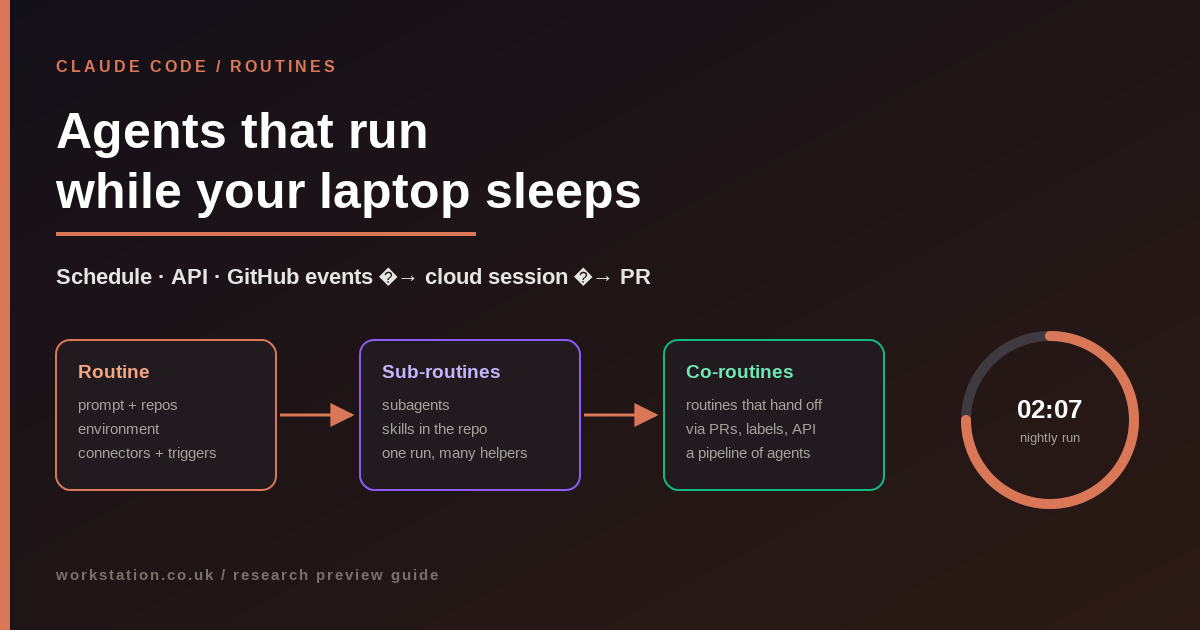
Claude Code Routines: scheduled cloud agents, sub-routines and co-routines

Claude Code no longer needs you at the keyboard. Routines run saved agent tasks on Anthropic's cloud on a schedule, from an API call or when something happens on GitHub. Here is what they are, how to set one up, and two patterns we call sub-routines and co-routines. For the full guide, read the long article.

Claude Code Routines: scheduled cloud agents, sub-routines and co-routines

Bottom line. A routine is a Claude Code task you configure once (prompt, repositories, cloud environment, connectors) and trigger automatically. It runs as a full autonomous session in the cloud, so your laptop can stay closed. Routines are in research preview (since 14 April 2026) on the Pro, Max, Team and Enterprise plans.

Three ways to start a routine

  • Schedule: hourly, daily, weekdays, weekly or a one-off time, entered in your local time zone. Custom cron is available via /schedule update, with a minimum interval of one hour.
  • API: a per-routine HTTPS endpoint with its own bearer token. Your alerting tool or deployment pipeline POSTs to it, optionally with context text. That text arrives labelled as untrusted, so a leaked token cannot rewrite the routine's instructions.
  • GitHub: pull request or release events, filtered by branch, label, author, draft or merged state.
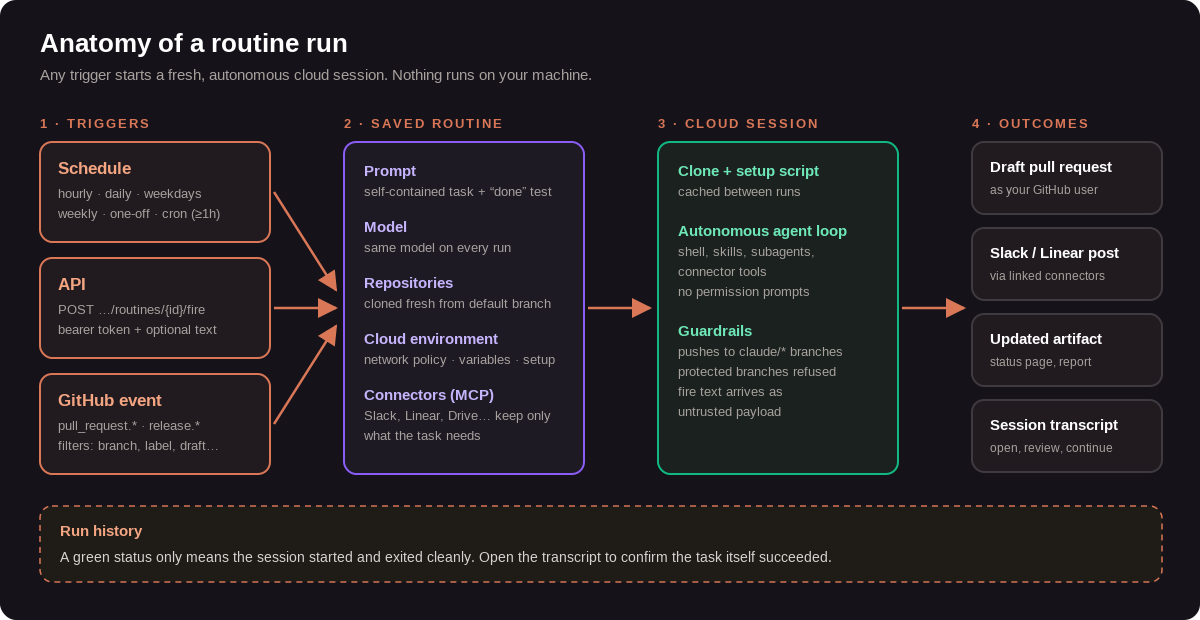
Anatomy of a routine run: triggers, saved routine, cloud session and outcomes

Set one up in two minutes

  1. Open claude.ai/code/routines and choose New routine, or type /schedule in the Claude Code CLI.
  2. Write a self-contained prompt: scope, allowed actions, output destination and what to do when there is nothing to do.
  3. Pick repositories and an environment. Remove connectors the task does not need, because all of them are included by default.
  4. Add a trigger, choose Run now to test, then read the transcript. A green badge only means the session ran, not that the task succeeded.

Sub-routines: one run, many helpers

This is our name for a pattern, not an Anthropic feature. The routine's prompt orchestrates, and it hands each step to a subagent (.claude/agents/) or a skill committed to the repository. Each helper gets its own context window and only the tools it needs, which keeps long unattended runs focused, cheaper and safer.
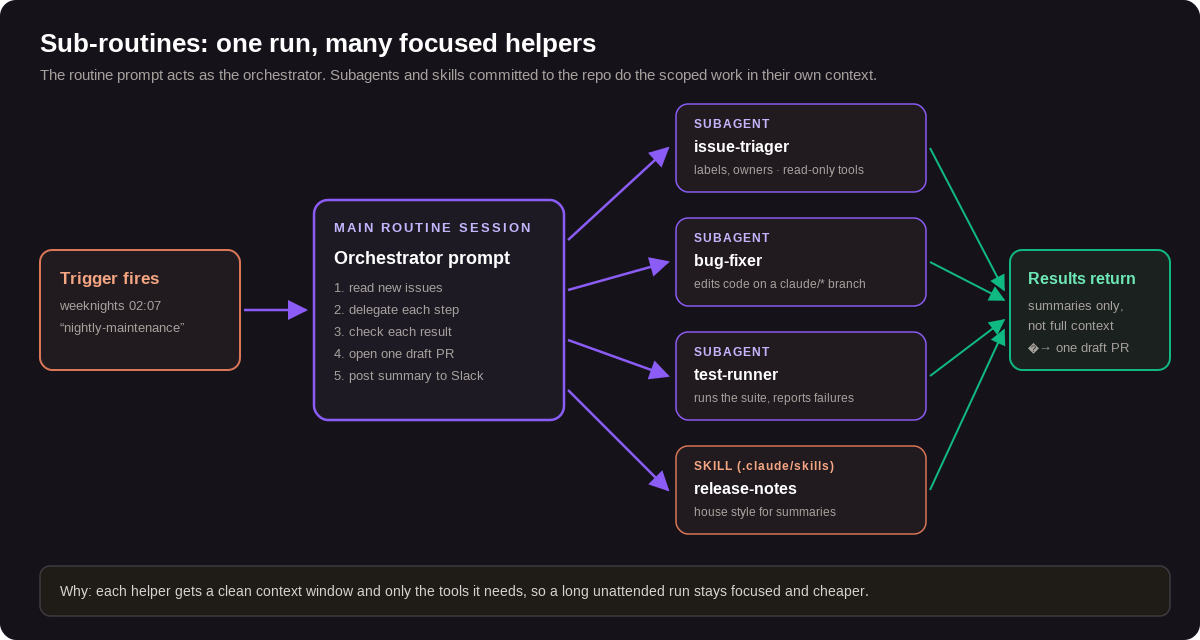
Sub-routines: an orchestrator prompt delegating to subagents and skills

Co-routines: routines that hand off work

Routines cannot call each other directly, but they can cooperate through durable artefacts. For example, a nightly routine opens a draft PR, a GitHub-triggered routine reviews it, a human merges it, a merge-triggered routine updates the docs, and your deployment pipeline calls a verification routine. Use filters so no routine fires on its own output, and keep a human merge gate in the chain.
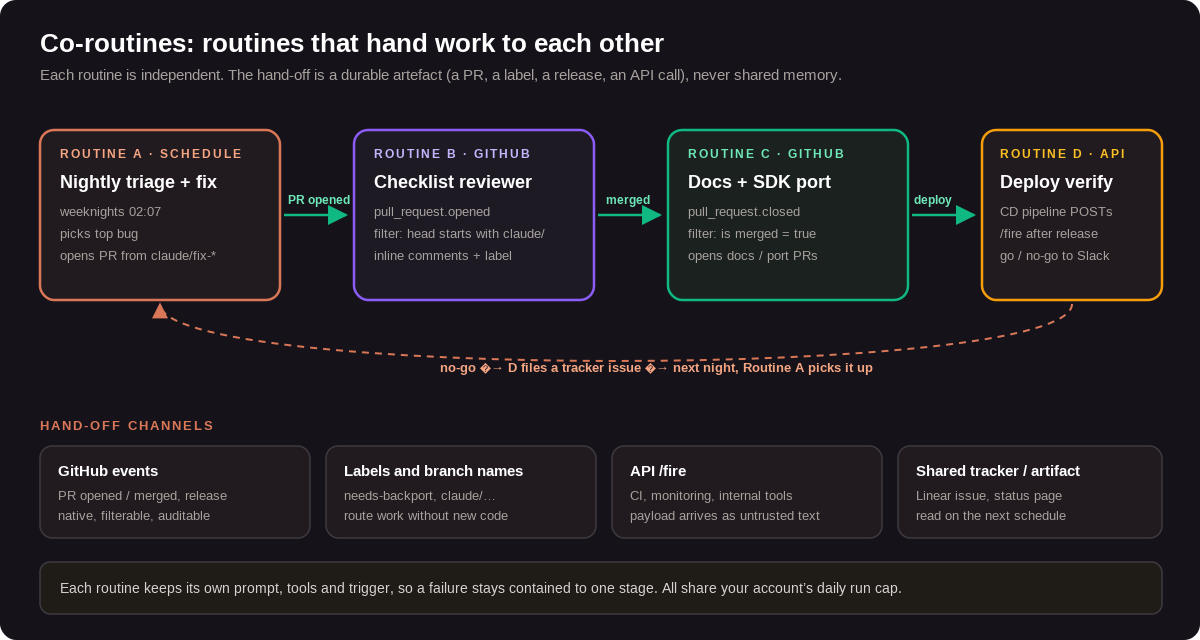
Co-routines: four routines cooperating through GitHub events, labels and API calls

Limits worth knowing

  • Daily run caps at launch were 5 on Pro, 15 on Max and 25 on Team and Enterprise, on top of normal subscription usage. One-off runs do not count.
  • Routines act as you. Commits, PRs and Slack messages carry your identity. Claude pushes only to claude/ branches unless told otherwise, and never to protected ones.
  • Need minute-level polling or local files? Use /loop or Desktop scheduled tasks instead.

Read next: the complete guide covers API payload security, prompt templates, subagent examples, comparisons with GitHub Actions, n8n and Trigger.dev, and a governance checklist. Sources: Anthropic announcement · Claude Code docs.